

- No Code Platform is the next IT Revolution and will help small and medium organizations to embrace Industry4.0
- NO CODE platform allows user to create their own web, Android, or iOS application without any IT skill or coding, just drag and drop
- No risk, start app within a few minutes and start using and applying in your organization within a few days
Each Industry has its own revolution and evolution as time moves on. Just like any other Industry, IT (Information Technology) is also going through the next big revolution around us. Coding is one of the passions for many hardcore IT engineers, while it could be a headache for non-IT person. The next big revolution in IT is “NO CODE” platforms. Yes, it is, even if it sounds contradictory to the passion of IT engineers.
Industry 4.0 is a big buzz around but in reality, it might be limited to big corporate and OEM or Tier 1 only. The investments required in hardware and coded software are so huge that probably SME’s might not even reach that level in the next decade because of the required investment. However, no one is suggesting an alternative to it, even though the fact is all your employees are carrying real-time data tracing device that is their Android and iOS phone which itself could become an alternative without any investment for the company owner.
What is the NO CODE platform?
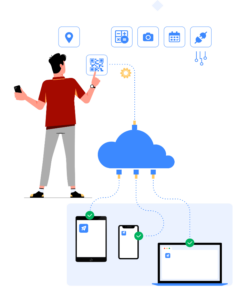 NO CODE platform allows user to create their own web, Android, or iOS application without any IT skill or coding. These platforms do not require any database and server as it’s a mostly cloud-based solution, so even that skill of database configuration or cost is not at all required.
In earlier days creating a website for engineering or production companies was challenging as they were hardcoded in PHP, Java, or low coded in word press. But today making a website thanks to NO CODE platforms is just like drag and drop and many such platforms are available. Being a non-IT engineer you can apply your own thought, ideas while creating your own website without depending on any IT skill or the software developer. Cost and time saved using this NO CODE are huge with the flexibility to change your own website whenever you wish.
How does the NO CODE platform work?
The idea behind the NO CODE platform is allowing the user to become their own designer in terms of applying their ideas, logic, and workflows which itself is very difficult to explain and express to others. NO CODE platforms itself are of course developed using codes by their developers, In order to ensure that their users do not need coding skills while using their NO CODE platforms. Another very basic example is Google forms, which is NO CODE tool to create your own forms, though it has limitations on other requirements, workflows, and so on.
Below are general steps that most NO CODE platform follows,
Step 1 Design Application
They provide various input blocks which user can pick and choose while creating their own applications. These input blocks are nothing but various fields one could need depend on the type and use of the application.
 Single/multiple line text: When you wish the user to add single line text in any application e.g. customer name, address, phone no, email. Long description etc. Dropdown menus: Many times we want users to select from the given choices rather than input on their own. For example state, country, city, Part or model name, shift, employee name, etc. Date & time: These are ready-made given whenever you want users to inform time and date in your application. So using them you get the automatic time and date selector like we get in our mobile date and time settings. Shift date and time or reporting date and time.
Single/multiple select: When there are predefined options and the user has to select one or few options from the given or predefined options e.g. shipping checklist, document list, Quality test lists, shift. Barcode: Print or read barcode/QR code fields. GPS location: Whenever you need GPS location to be recorded by users. Formulae and calculate logic: Apply IF, ELSE, AND, OR, NOR, and other EXCEL formulae to add, multiply, etc. Upload Files: Images, files pdf, report of anything user wish. Auto unique no: System generated unique no with prefix and series selection, as you wish. E.g. Invoice no, quotation no, part no, etc. Embed & HTML support: Various external info, images, payment gateway, dashboard graphs from excel can be embedded within the App.
Step 2: Configuration
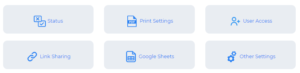
Status: for each submission users can define different statuses like Approved, Hold, Reject, Accept, etc. This allows users to monitor various submitted data and approval procedures. Later dashboards can be prepared as per their status.
Print Setting: Create your own print layout and formats without any coding. Even you can upload word formats. The best part is, it will support all the fields you have created in App so it will pull information directly from the data submitted in the App. E.g. customer name, address, and production order no, part details, etc.
Google sheet sync: you can sync your app with google sheet so all data submitted by the user will automatically reflect in the attached Google sheet. On otherwise, you can create a various dashboard that will change in real-time as new entries are submitted in the Apps because it is synced with Google sheets. These dashboards can be again published and embed in App so your dashboard can appear in Apps directly without paying any additional cost for the dashboard, which is a very costly affair otherwise. You can design your own dashboard as many as you wish.
User rights: you can assign various user access rights to your employees/users. Some can only view data, some can submit but can’t edit, while some can review and edit, etc.
Step3: Workflow
This is the most advanced and very useful feature which make this NO CODE platform even better than very basic or advance ERP software, though it is not ERP. These workflows help to achieve various BPA – Business Process Automation which is the need of the hour. This could be very basic or much complex as per customer requirements.
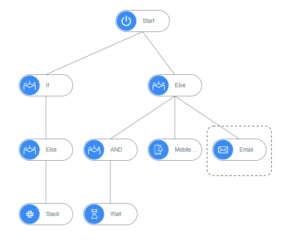
Workflows can triggers email, SMS, WhatsApp, create, or edit values in other Apps. Even it supports condition-based workflow like IF-Else etc. These can be set at three-level when the user submits data when review/edit the data or when it is approved.
Email/SMS/WhatsApp: These advance features helps users to share the information or certain info of the submission in App as desired. You can fetch email addresses from master or any App like customer email, email set of an internal company group, etc. In the email body you can define the standard format which you mention while sending quotation, invoice, in case of rejection, the release of production, maintenance, etc. however the specific details related to quotation no, customer, machine name, etc. will be pulled from App directly. This reduces whole efforts required to send emails, communication with customers or internal which is called BPA.
IF-ELSE workflow: This conditions based logic takes this workflow to an advanced level, where users can trigger or send alert IF certain conditions arise. E.g. If min stock goes beyond define value send EMAIL/SMS etc. If fire or breakdown incidents happens send SMS/EMAIL to 10 concern person across the management. If rejection happens email/SMS to planning head.
Rest API (application programming interface): API allows to interface various external Apps and platform to communicate with each other. This will be the next big revolutions where various ERP software, machine manufacturers, the device manufacturers will be driven in the direction to open their API and allow other systems to exchange data in an open environment. Storing data by each OEM on its own cloud has no relevance for the buyer, for the use of all the device’s data collectively gives them full traceability, interconnects, and better root cause analysis in case of defects/rejections. Even high-end ERP software like SAP, Oracle, and others have been exploring and allowed open API to meet this purpose. This will help to achieve Industry 4.0 in a more realistic manner.
Create/Edit submission: This unique feature allows the user to change the data from one app to another. For example, when we stock out the same quantity is reduced from store current stock so you get real-time data of current stock. This allows changing data from one app to another using workflow without opening/accessing the app.
Step 4: Publish
 Within a click of a button, your Apps will be live on Android, iOS, or Web. However, your apps will not be visible to anyone other than those to who you have given the right to use App. It means your apps, structure, flow is confidential and accessible to you, and your organization only not open to all.
WHY NO CODE Platform?
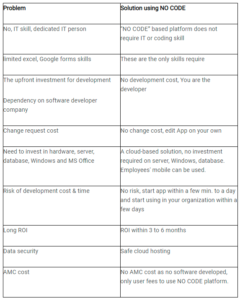
NO CODE platform will revolutionize SMEs as they could save lots of upfront investment, which are major hurdles to become digitize compare to large companies.
No Code: Where it can be used?
You can walk around in your company and where ever you find paper, Excel, email communication for information, various quality certificate, vendors, Quality, and whatnot. It is a case study that is possible very wherever you can think of it in your organization.
HR & Admin – Various excel file/forms to collect data from employees, Furnishing allowances automatic workflow, Reimbursement workflow, Employee Attendance Tracker, Reception Management, Canteen management – visitor pass & approval, Leave application and approval workflow, Candidate Screening Tracker, Hire Checklist, Staffing or Recruiting Plan, Employee Work Schedule and Employee Training Plan & Evaluation.
Sales – Travel Templates, field visit report, Sales Pipeline & Forecasting, Offer formula & auto offers workflow, Printout, Sales Activity Tracking, Sales Call Planner & reminder, SDR Performance Calculator, Sales Compensation Plan, Budget plan, Events planning & alerts and Checklist & team tasks.
Design & Development – Get supplier production feasibility criteria, New product development criteria, Product development planning & Task management, and Gantt chart & timeline planning.
Purchase – Asset management & tracking, Vendor registration & approval, Supplier audit & auto-approval, Documentation, GRN notification, Supplier auto workflow & triggers, Reminder & triggers for purchase activity, Supplier management of task & checklist, Supplier evaluation and reporting, and Supplier facility management.
 Production – Production Document management, SOP management, and sharing – auto workflow, Team report- SMS, Email automation, Rejection report, alert – SMS, Email workflow, Project management updates, Progress report automation, Control plan v/s actual quality inspection, Cp, Cpk, mean and others, MIS auto-update & dashboard, Downtime alert & intimation to maintenance, Production & downtime report and triggers and New order-dispatch alerts and a common platform for customer and supplier.
Store – Asset management & tracking, Asset movement, Tool/pattern usage, Maintenance alerts, Tool movement, Store locator, Auto workflow /reminder on unreturned items, Under stock item list & reminder, Inward-outward & Net stock, Challan, and Store audit.
Maintenance – Issue-tracking, Spare parts planning, Contractor, AMC, Service request, planning and status, Maintenance planning & reminder, Equipment, building, vehicle maintenance, Maintenance report & auditing, Fire, safety plan and Maintenance status.
Quality – Quality control plan for a customer, supplier, Quality inspection & reports – auto email, TC print and automation, Rejection alerts & triggers, Tool & gauges, location, store, owner, Calibration status & reports, Rejection report & MIS, Checklist, Internal & external audits, Fire & safety reports & audits, and Third-party inspection & reports.
Dispatch – Checklist, Document list verification, Export documentation library, Dispatch plan & alert, Logistic, Tracking, Truck details, Tracking access to customer, Delay, accident alerts, Insurance & others, Barcode, tags, and packaging.
For more details, visit https://www.auto-design-online.com/products/nocode/